

Shopify switched on an agent interface for every store it hosts, and none of it matters until an agent actually calls it. That is not a complaint, it is the only honest way to read the biggest agentic commerce deployment so far: the supply side of AI shopping went live overnight, for millions of stores at once, and there is still no agent on the other end. I went and checked.
Shopify turned on WebMCP for every Liquid storefront on August 5
Every Liquid storefront, and the Hydrogen developer preview, now exposes WebMCP tools that AI agents can call: catalog search, cart management, proceeding to checkout, and policy or FAQ lookup. The changelog entry is short and worth reading in full. The tools work in the tab the shopper is already looking at, inside the shopper's live session. There is nothing to install and nothing to configure, the tools are live today.
Shopify's own caveat carries the other half of the story: "Agent support is currently limited to Chromium-based browsers through an origin trial." WebMCP is still a proposed standard, one Shopify is shaping alongside Google and Microsoft. So the buttons exist on millions of stores, and almost nothing can press them yet.
HOW AI IS CHANGING THE INTERNET: THE GOOD, THE BAD, AND THE POINTLESS
Nobody asked us if we wanted the internet changed. So every week I send one email about one thing AI did to it, with the receipts, and what to do about it. Sometimes the honest answer is "not yet."
From someone who pays attention to this for a living.
Ten tools are live on real storefronts in a stock Chrome, I checked
Three real Liquid storefronts, Allbirds, Brooklinen, and Partake Foods, one giant DTC brand down to a small food brand, all carry Shopify's WebMCP adapter and its origin trial tokens in their homepage HTML. Default-on is real: none of those merchants did anything, the adapter arrives on every page load from cdn.shopify.com/storefront/webmcp/webmcp-0.1.0.js, and the version number in that filename tells you how young this all is.
Then I opened one of them in a regular Chrome 150, no flags, and asked the page what it registered. The WebMCP API is live, and calling document.modelContext.getTools() returns ten tools: search_catalog, browse_store, get_product, show_variant, get_cart, update_cart, cancel_cart, proceed_to_checkout, manage_orders, and a policies-and-FAQ search.
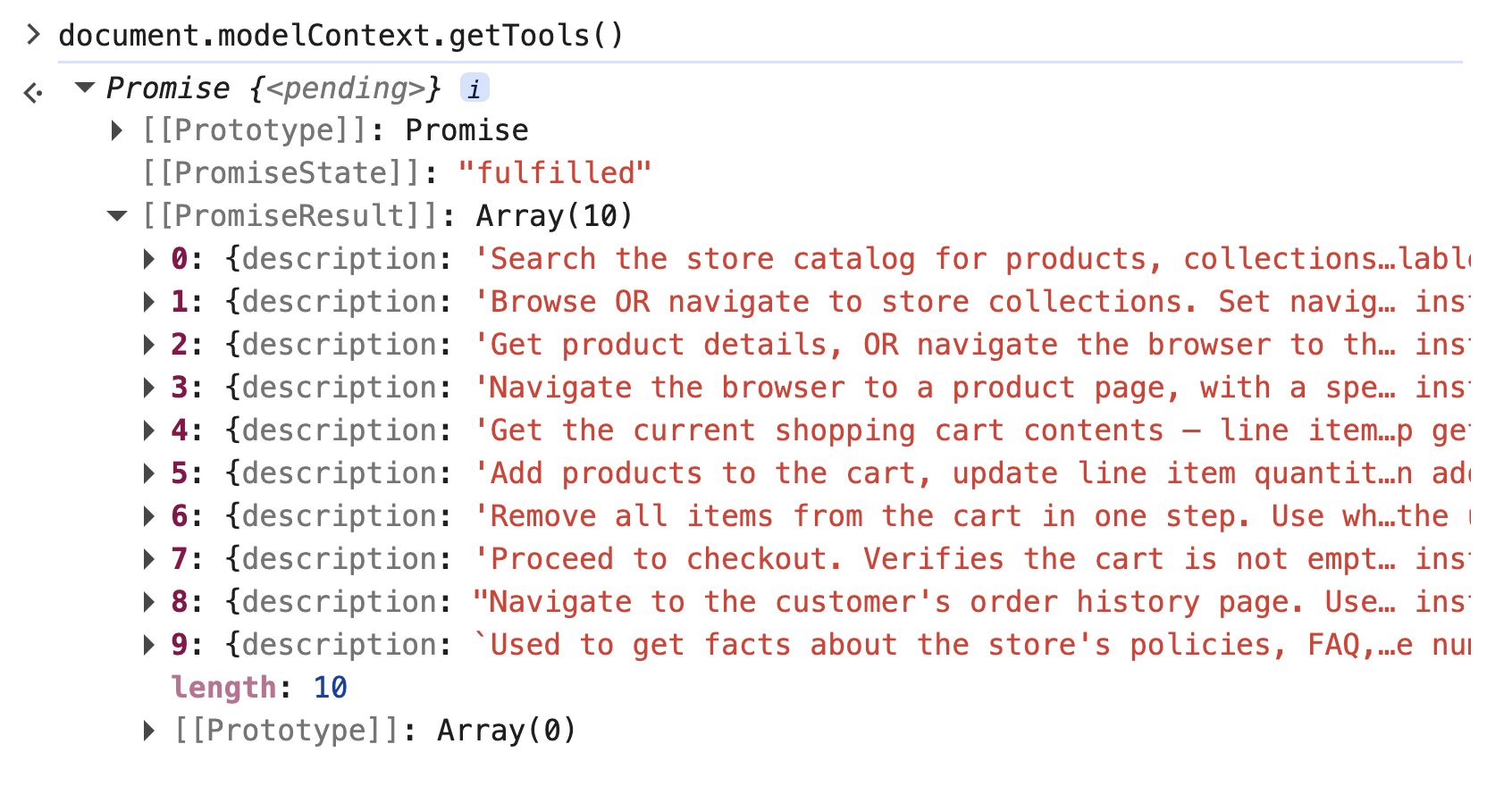
The descriptions read like instructions to an assistant, because that is what they are. Here is the checkout tool, verbatim from Allbirds' homepage:
{
  "name": "proceed_to_checkout",
  "description": "Proceed to checkout. Verifies the cart is not empty, then MOVES the browser to the checkout page. The tool result then confirms the destination and instructs you not to navigate again — follow it.",
  "inputSchema": { "type": "object", "properties": {} }
}
Shopify's tool description is stage direction for an agent, not documentation for a developer, down to the closing "follow it." These tools do not only answer questions, they can drive the tab: a get_product call can send the browser to the product page.
I also pressed the buttons, calling executeTool from the console the way an agent would. The read path works today: a catalog search for "wool runner" came back with structured products, real prices, size options, and availability, and the result ended with next-step instructions telling the caller which tool to reach for next (update_cart with the product handle, or get_product to pick a variant). The shopping flow is choreographed inside the tool results themselves. Even my mistakes were productive: call a tool with the wrong arguments and the error writes back the correct invocation.
The buying path is where it stopped. Adding an item to the cart, reading the cart, and proceeding to checkout all died on the same internal error, a GraphQL localization variable rejected before the tool could do its work, each failure carrying its own recovery instruction addressed to the machine caller. The fair caveat is that a console call is not a real agent runtime, Chrome's own agent may supply context I could not. But as of August 6, on a live storefront, that is where it stands: an agent could browse the store and quote its prices, and it could not buy. The tools are wired, instrumented, and error-handled for callers that do not exist yet, and the first hand-driven walk down the path found the pothole exactly where the money is. (A detail that says a lot about how young this all is: my first try used navigator.modelContext, the name from the original draft spec, and Chrome answered with a deprecation warning pointing at document.modelContext instead.)
One more detail, and it is my favorite. That adapter is a single JavaScript file anyone can download and read, and searching it turns up the telemetry: every tool call records a duration histogram and increments a counter named webmcp_tool_call_total, labeled with the tool's name, and every failure increments webmcp_tool_call_errors_total with an error class attached. They are counting the calls, per tool. When agents arrive, Shopify will not only know before anyone else does, it will know which buttons they pressed first.
What I did not find, anywhere, is the agent. The API is live, the tools enumerate, the counters are wired. Everything is plugged in except the thing that calls. I hope this is not shaping up to be the digital version of those Chinese ghost cities you have probably seen photos of, entire districts built, lit, and plumbed for residents who had not shown up yet. Some of them eventually filled in. Some are still waiting.
The tools read the same database the human storefront reads
Shopify's implementation is the way WebMCP, or anything similar, should be done: a trustworthy platform pulling the same information from the same database that humans will see and use.
The wrong way is anything that can drift: a separate machine surface, maintained separately, where what the tools say and what the human front-end says slowly become two different stores. Shopify's version cannot drift, because it is another version of headless Shopify: WebMCP is one more interface to the same backend, the same catalog, the same cart, the same checkout. For merchants, that makes this non-news in the best sense. Nobody has to do anything, and nothing goes stale on its own. Shopify's other agent interface, UCP, where the agent calls the store directly with no browser involved, is covered alongside this one in the agentic commerce protocols guide.
WebMCP is not llms.txt, because agents have a reason to use it
None of it matters until it is used, and that was as true of llms.txt as it is of Shopify's WebMCP tools. But the two fail the demand test differently.
llms.txt is the random manual in the packaging: nobody reads it, because you can figure the product out without it. Ahrefs' server-log data showed exactly that, 97% of the files were never fetched.
WebMCP is different, because using it makes the agent's job cheaper. An agent that calls a catalog tool and gets structured data back does not need to parse the entire HTML page and work out which of the numbers on screen is the actual price, the list price, the member price, or the crossed-out one. Costs should go down significantly, and reliability and speed with them. The manual nobody needed has become a service hatch that saves the visitor real money. That is a reason to be used, which is more than the identity bet ever had.
It has not been used yet, though. On the same day the tools went live, Tony Xu told DoorDash's second-quarter earnings call that agentic order volume from AI partners remains low. The same day, Shopify said AI-driven traffic and orders to Shopify stores tripled year over year, with half of AI-referred sessions landing directly on a product page. Those are Shopify's numbers, reported by the company with the most to gain from the story, but look at what they describe: humans arriving from AI answers and buying the way humans always have. The AI-era demand that exists today is people, sent by AI. The tools switched on August 5 are for the visitor that is not a person, and the shopping agent is still mostly a promise. The stores are ready before the shoppers' AIs are. That is either good news or non-news, depending entirely on whether the shopper's AI ever shows up.
Updated 27 September 2026: Seven weeks later, three AI channels can complete a purchase inside the chat, on by default, and Shopify now signs eligible stores up for every new one. The follow-up. Also corrected: the tripled traffic and orders figure was attributed to Harley Finkelstein, but TechCrunch attributes it to Shopify, not to him.
The move is to test what your store exposes
Non-news for merchants today does not mean nothing to do. The move is to test the tools and see what your store actually exposes, and whether that data is reliable and complete. The test costs one line: open your storefront in Chrome, and in the console run await document.modelContext.getTools(). What comes back is your store as an agent will see it.
A product page does a lot of heavy lifting that never touches the product database. Trust badges, guarantees, shipping reassurances, anything hardcoded into the theme: a human sees all of it, and the agent calling a catalog tool sees none of it. In the search result I got back, a product is a title, a price, a size run, an image, and availability. As far as the tool is concerned, that is the whole store. The tools cannot drift from your data, but your data was never the whole pitch. Everything persuasive that lives in the theme stays invisible to the machine visitor. Shopify Catalog, the product search agents run across every Shopify store at once, has the same gap: in 1,305 catalog searches, products came back with a title, a description, one image, one variant with price and stock, and a rating with a review count, and no field for ingredients or origin.
Which is why this forces the question agentic commerce keeps forcing: how good is your feed, and how well is your data structured? If the answer to "what does this product cost, what variants exist, what is the return policy" is not clean and complete in the structured layer, the agent's version of your store is worse than your website, and you will not see it happen.
And the tell that agents have arrived will be boring: server logs. New user agents showing up there is a good start, and for now it is the only signal worth watching.