

Google's seven rules for building agent-friendly websites are the accessibility playbook restated for AI agents. Same audit, two visitor classes. The practitioners who already did the work for blind and low-vision users are most of the way to passing.
I noticed the page because Matt G. Southern wrote about it on Search Engine Journal yesterday. The web.dev article itself (web.dev/articles/ai-agent-site-ux, by Kasper Kulikowski and Omkar More) was last updated April 1, almost a month ago. Your TLDR version of it is: Google has shipped a checklist, kind of, and it's worth running.
I tested nohacks.co against all seven rules. Six passed. One failed on every native <button> element on the website, and the cause is a Tailwind v4 default that ships with no warning. Operators who upgraded from v3 to v4 lost this rule across their entire button population unless they added three lines back to their base styles.
The interesting part is which rule that is, and why.
And of course I fixed it :)
The seven agent-friendly rules Google published on web.dev
The full list lives at web.dev/articles/ai-agent-site-ux, introduced by Google with the line "To help agents navigate your website, consider following:"
- Reflect every action in the interface. A button click should produce a visible state change. An action that fires silently is invisible to the agent.
- Keep the layout stable. "Add to cart" should sit in the same place across product categories. Agents that take screenshots get confused by elements that shift between pages.
- No ghost or transparent overlays. Anything that covers an interactive element gets discarded by visual analysis, even if the cover is fully transparent.
- Use semantic HTML.
<button>and<a>over styled<div>and<span>. If you must use a non-semantic element, give itroleandtabindex. - Set
cursor: pointerin CSS. Google calls this "a strong signal for actionability." - Link
<label>to<input>with theforattribute. Lets the agent map the visible label text to the underlying field. - Make interactive elements bigger than 8 square pixels. Visual analysis filters out anything smaller.
Two things Google did not say. First, the verbatim framing is "consider following". Suggestion-grade, not mandate. Second, nothing in the web.dev article ties these recommendations to ranking, surfacing, or any specific AI-product-side consequence. Worth naming the gap. Google said consider; I'm pushing harder than that, because the source is the dominant search vendor and the list overlaps with two decades of accessibility practice. So the prescription below is mine, not theirs.
The closest thing to a punchline in the article is the second-to-last sentence: "Everything we suggest to make a site 'agent-ready' also makes sites better for humans." That's not throwaway. Every item on the list was already a WCAG recommendation when web accessibility advocates were the ones documenting it, a decade ago.
I also really like how this pairs with "machine-first, human-always" in Machine-First Architecture.
GET WEEKLY WEB STRATEGY TIPS FOR THE AI AGE
Practical strategies for making your website work for AI agents and the humans using AI to find you. Once a week you get the new articles, the latest podcast episode, and a few links worth keeping.
Six of Google's seven agent-friendly rules pass on nohacks.co (1, 2, 3, 4, 6, 7)
I ran the audit by inspecting the live HTML on the homepage and on a representative article page, the agentic browser landscape guide. The method was unglamorous: curl the page, grep for <button>, <a>, <label for=, pointer-events-none, then pull the compiled CSS and grep for cursor.
- Rule 1 (clear state): Every interactive element uses a
transition-allclass. Hover states scale the primary CTA. Inputs get a focus ring. State changes are visible. Pass. - Rule 2 (stable layout): No layout-shift sources in the HTML. Header, navigation, and footer are consistent across home and article. No content reflow on hover. Pass.
- Rule 3 (no ghost overlays): The only
pointer-events-noneelement is the back-to-top button itself when it's hidden. The button is non-interactive AND invisible at that moment, so it isn't covering anything. Pass. - Rule 4 (semantic HTML): Eight
<button>elements on the homepage with properaria-labelattributes, plus 45<a>elements. Zero<div role="button">. Zero<span onclick>. Pass. - Rule 6 (label-for): The newsletter signup uses
<label for="newsletter-email" class="sr-only">. The label text is screen-reader-visible and linked to the input by theforattribute. Pass. - Rule 7 (size threshold): Buttons render at 40 pixels by 40 pixels (
h-10 w-10in Tailwind). Inputs arepx-5 py-3. All well above 8 square pixels. Pass.
That leaves rule 5.
Rule 5 (cursor:pointer) fails on every native button under Tailwind v4
Native <button> elements on nohacks.co render with cursor: default, not cursor: pointer. The failure spans the mobile menu open button, the newsletter Subscribe submit, six podcast episode play buttons on the homepage, and the floating back-to-top button. The article page adds two more newsletter Subscribe submits (one above the article, one below). Twelve unique native <button> elements across the two pages. None of them get the cursor signal.
<a> elements are fine. Anchors with href get cursor: pointer from the browser default, and that hasn't changed. The failure is button-specific.
The cause is a Tailwind v4 change. From the official Tailwind CSS v4 upgrade guide:
"Buttons now use
cursor: defaultinstead ofcursor: pointerto match the default browser behavior."
Tailwind v3 included cursor: pointer on <button> as part of its Preflight base styles. Tailwind v4 removed it. Operators upgrading from v3 to v4 don't notice because the keyboard navigation still works, the screen reader still announces the button, the click still fires. The accessibility tree is unaffected. The thing that breaks is the visual signal that something is clickable, and that signal is rule 5 on Google's list because it's specifically what the vision-model side of the agent uses to decide what to interact with.
The fix is the snippet Tailwind ships in the same upgrade guide:
@layer base {
  button:not(:disabled),
  [role="button"]:not(:disabled) {
    cursor: pointer;
  }
}
Three lines. Restores rule 5 across every native button on the website. The :not(:disabled) clause preserves the existing disabled:cursor-not-allowed pattern that Tailwind users already have on their disabled-state buttons. Drop it into the global stylesheet and rule 5 passes on every button at once.
Every rule on Google's list maps to an existing WCAG recommendation
The accessibility community has been writing the same list for two decades. Five of Google's seven rules map directly to a WCAG criterion:
- Rule 2 (stable layout) overlaps with WCAG 2.4.3 (Focus Order) and WCAG 3.2 (Predictable).
- Rule 4 (semantic HTML over styled
<div>) is the foundation of the WAI-ARIA Authoring Practices and WCAG 4.1.2 (Name, Role, Value). - Rule 5 (visible cursor signal) maps to WCAG 1.3.3 (Sensory Characteristics).
- Rule 6 (label-for-input) is WCAG 1.3.1 (Info and Relationships).
- Rule 7 (minimum interactive size) is WCAG 2.5.5 (Target Size). The human-readable version is 24 by 24 CSS pixels; Google's threshold is lower because vision models can detect smaller elements than human users can comfortably tap.
The pattern is consistent. Build for assistive technology, build for AI agents. The audit is the same shape, run for two visitor classes simultaneously. The vocabulary is different. The artifact is identical.
Run one accessibility audit, recover both visitor classes
Stop running accessibility audits and AI-agent-readability audits as separate disciplines on separate quarterly cycles. They are the same audit. Web professionals who already invested in WCAG conformance are most of the way to passing Google's seven. Operators who never did the accessibility work now have the agent-readability work landing on the same checklist with vendor weight behind it.
Concrete move for this week:
- Pull the top five highest-traffic pages on your website.
- Run them through both Google's seven rules and a WCAG-AA scan (Lighthouse, axe DevTools, the WAVE extension; whichever you already use). Note the overlap.
- Fix once. Recover both visitor classes.
If you are on Tailwind v4, add the three-line @layer base snippet to your global stylesheet first. That single change recovers rule 5 across your entire <button> population. It is the single biggest fix on the list because Tailwind v4 ships everywhere now, the accessibility tooling won't flag it (the click still works), and nobody is talking about this regression.
Search interest in "web accessibility" barely moved when the EAA took effect, then quadrupled
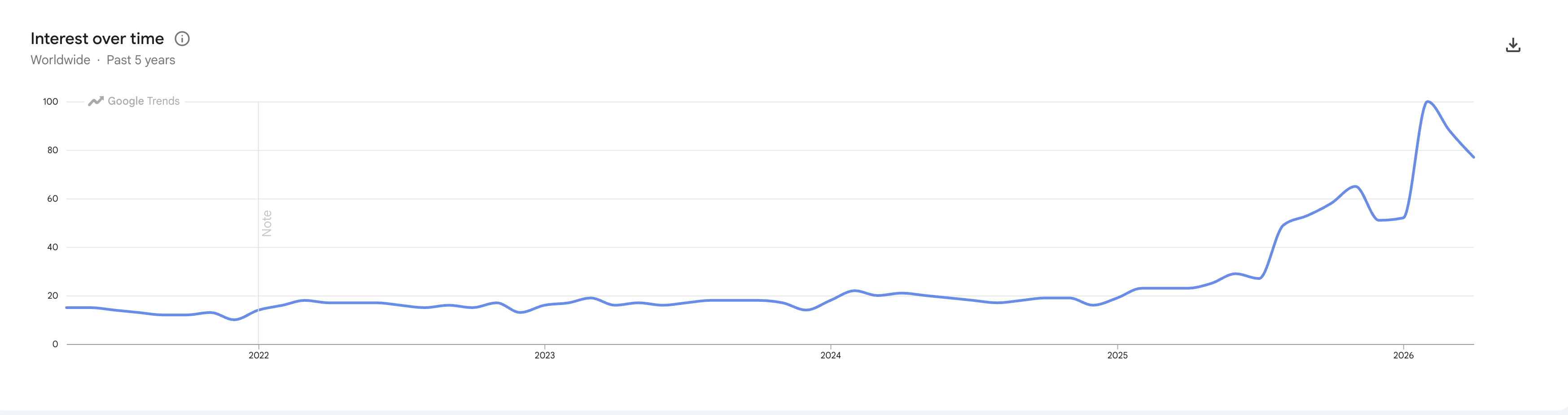
Worldwide search interest in "web accessibility," past five years. Source: Google Trends, captured 2026-05-02.
Search interest was flat for four years. Through 2024. Through most of 2025. Through the European Accessibility Act becoming applicable on 28 June 2025, which is the regulatory event that should have moved this curve more than anything else and barely did. The bigger climb starts late 2025, accelerates through early 2026 to its peak, and has settled lower since. Worldwide search interest in the term more than quadrupled in 18 months.
I am not claiming the AI-agent coverage is what drove this. The data is correlational. But the shape is interesting: the regulatory event that should have spiked the curve barely did, and the curve started moving when the audience for accessibility-shaped guidance started overlapping with the audience for AI-agent-readability guidance.
The convergence is a decade old; Google's vendor weight is what's new
The last decade of accessibility work was carried by a community that mostly didn't have the weight to make it the dominant audit discipline. The work was the right work. The audience didn't show up. Then AI agents arrived with budget, traction, and a vendor-side incentive structure pointing the same direction. When Google publishes the same checklist as agent-readability guidance, the discipline stops being two audits run by two separate communities. It becomes one input-side discipline that web professionals run because the visitor class spans both.
Six of seven on the audit is a passing grade. The seventh is a CSS rule that was Tailwind's job to set, and now it's yours.
Trust... no one? At least, not blindly.